
 (English CV; editor in Spanish)
Hospitality
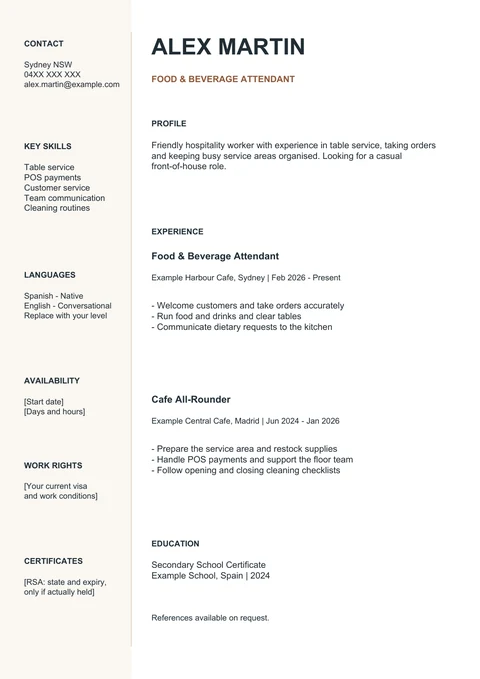
Food service, customer service and coffee. Two columns make experience and availability easy to find.
Customise a template (English CV; editor in Spanish)A good resume makes it easy to find what matches the role. Use these templates as a starting point and replace every example with real experience: you do not need to invent Australian jobs to present your existing skills well.
Adapt a template to a specific vacancy and your actual experience. These checks are preparation suggestions; always provide what the employer requests.
Choose a template · Describe tasks in English · I have no experience
Read the duties, availability and requirements. Choose two or three experiences relevant to the vacancy and put the most useful first. A kitchen CV and a reception CV may share details but highlight different skills.
Length depends on your experience and the employer's instructions. For an initial application, aim for a short, readable document; do not shrink the font to fit everything. Follow any required forms and selection criteria.
| Section | Useful information |
|---|---|
| Contact | Name, city, phone number and an email you check |
| Profile | Relevant experience and what you offer the role in two sentences |
| Experience | Role, employer, dates and actual duties |
| Availability | The start date and hours you can actually work |
| Training and certificates | Relevant qualifications you can substantiate |
For privacy, do not include your TFN, passport, bank details or visa documents. Where relevant, describe availability and work rights accurately without attaching identifiers. Ask permission before sharing a referee's phone number.
Do not claim to have an RSA, White Card or licence if you do not. If training is pending, say so clearly rather than presenting it as a certificate already obtained.
Three layouts without photos, with examples in English. Choose one, replace the text and save an editable copy or PDF. No account, payment or subscription required.
(English CV; editor in Spanish)Food service, customer service and coffee. Two columns make experience and availability easy to find.
Customise a template (English CV; editor in Spanish)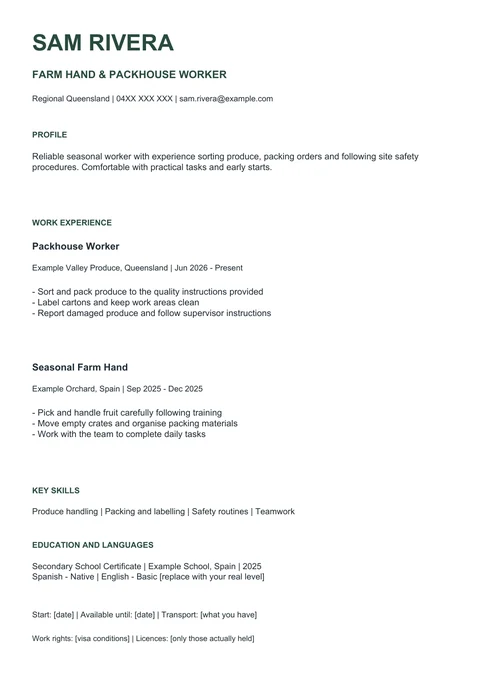 (English CV; editor in Spanish)
Farm work and packing. A straightforward single column for practical tasks, availability and actual transport options.
Customise a template (English CV; editor in Spanish)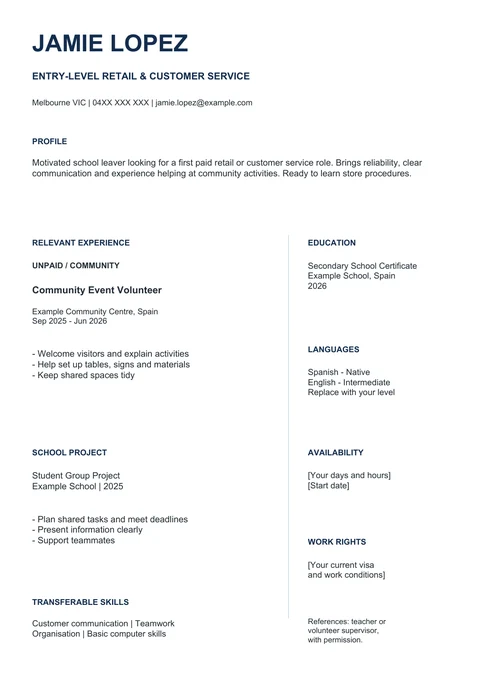 (English CV; editor in Spanish)
A layout with a broad profile and skills, volunteering and project sections for someone starting out.
Customise a template (English CV; editor in Spanish)Customise a template: opens the browser editor. Fields update the preview; you can also change section headings. The editor will tell you if text does not fit.
Download editable version: saves an HTML file that works offline. Open it in your browser, fill it in and choose Save editable copy. For a PDF, choose Save PDF / Print and select A4, 100% scale, no margins and no browser headers or footers.
Fillable PDF: edit the text in a compatible viewer, save and reopen it to check. The layout cannot accommodate unlimited text.
For Canva: you can import the PDF into your account and customise the design. Check the layout after importing and save a copy in your account.
If a job application form requires plain text, keep these versions: HospitalityFarm and packhouseFirst job. Compatibility with every recruitment system is not guaranteed.
Use a verb, task and context. Add an outcome if you can demonstrate it; do not invent percentages you never measured. These wording examples are for adaptation, not experience to claim as your own.
Customer service: Assisted customers, answered questions and kept the service area organised. Packing: Followed packing instructions and reported damaged items to the supervisor. Project or volunteering: Organised materials and coordinated a small team for [real activity].
In your own language, explain what you did, who you worked with and why. Avoid repeating responsible and hardworking in every section; a specific task demonstrates more. If a sentence does not describe your experience, remove it.
Ask someone else to review the English and clarity. Keep a copy of what you send and record the date, employer, vacancy link and reply. When reusing a template, also check availability and contact details.
Use projects, volunteering, training or responsibilities you have actually undertaken. Explain the task and what it demonstrates. Do not present a personal activity as paid employment.
No. Follow the vacancy's instructions first. Adjust the order and content so relevant experience is easy to find.
A photo is not needed for these templates. If an advertisement requests additional information, consider the requirement and how your data will be used before sending it.